7 Best Standing Desk Converters 2025: Transform Your Home Office Setup
The shift to remote work has exposed a critical flaw in most home office setups: we’re sitting too much, too long, in poorly designed spaces. While 73% of remote workers report back pain and fatigue, most make the mistake of thinking they need an entirely new desk or expensive ergonomic chair to solve the problem.
The truth? A standing desk converter can transform your existing workspace for a fraction of the cost while delivering immediate health and productivity benefits. But with dozens of models claiming to be "ergonomic" and "adjustable," choosing the wrong converter can leave you with an unstable surface, limited workspace, or worse – exacerbated discomfort.
This guide cuts through the marketing noise to help you select a standing desk converter that actually fits your work style, space constraints, and budget. We’ll explore the key features that separate quality converters from cheap imitations, and match specific models to different user profiles so you can make a confident purchase decision.
Key Features to Consider
Height Adjustment Range and Mechanism
The most critical factor is whether the converter can accommodate your height and preferred standing position. Quality converters offer 15-20 inches of adjustment range, while budget models often max out at 12 inches.
Gas springs provide the smoothest operation but cost more, while crank mechanisms offer precision control at lower price points. Avoid converters with notched adjustment systems – they rarely hit the exact height you need for proper ergonomics.
Weight Capacity and Stability
Your converter needs to support not just your monitor and keyboard, but also the dynamic forces from typing and mouse movement. Premium models handle 35-50 pounds while maintaining stability, whereas budget options often wobble under 20 pounds of load.
Look for converters with wider bases and solid construction materials. X-frame designs typically offer better stability than single-post models, especially at maximum height extension.
Desktop Real Estate
Measure your current workspace needs before shopping. Many converters sacrifice desk space for adjustability, leaving you cramped for documents, coffee, or peripherals.
Consider both the upper monitor platform and lower keyboard tray dimensions. Some models offer tiered designs that maximize vertical space utilization, while others prioritize a single large work surface.
Monitor Configuration Support
Single vs. dual monitor support dramatically affects price and footprint. If you use multiple displays, ensure the converter’s monitor arms or platform can handle your screen size and weight distribution without sagging or tilting.
Best Standing Desk Converters by Use Case
For Small Spaces: Compact and Efficient
VARIDESK Pro 36
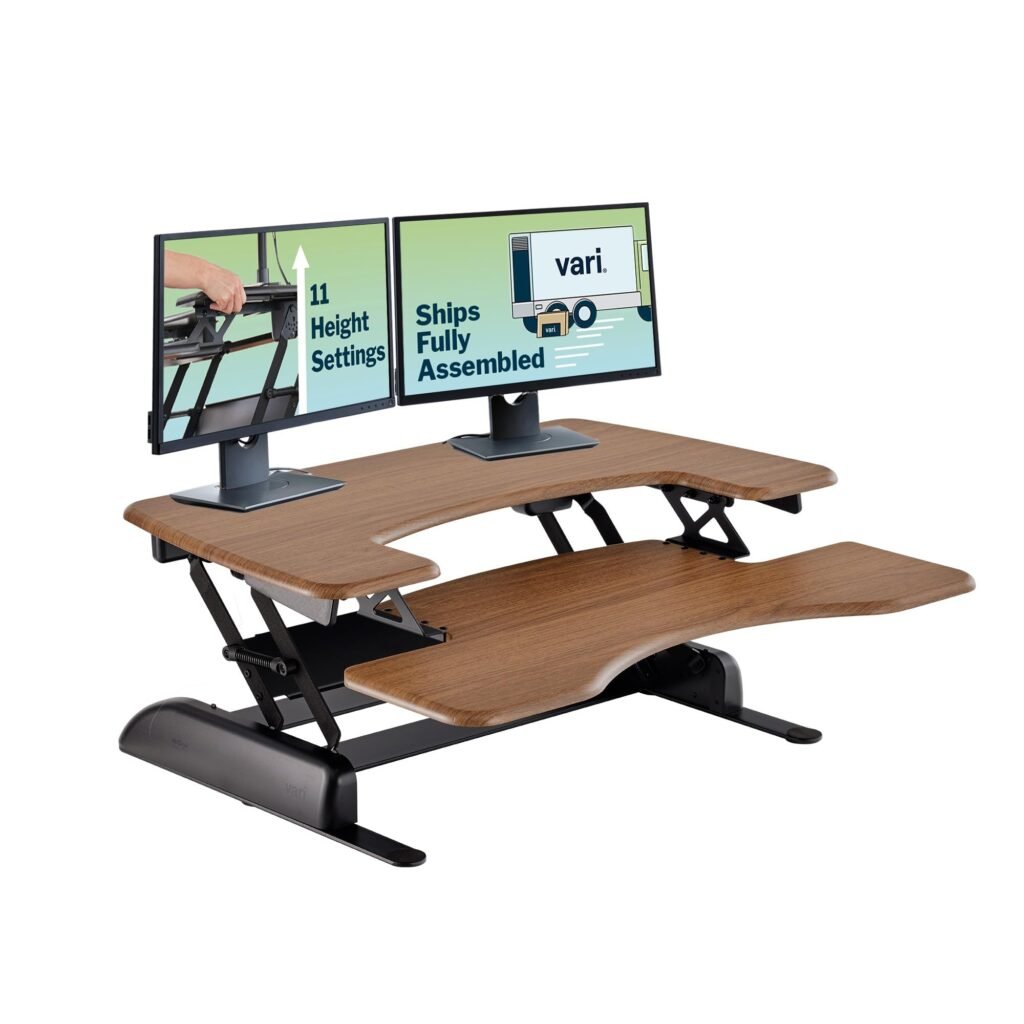
The VARIDESK Pro 36 Standing Desk Converter remains the gold standard for tight workspaces. Its 36-inch width provides ample room for a laptop or single monitor setup while maintaining a relatively small footprint when lowered.
The dual-platform design separates your monitor at eye level from your keyboard at elbow height – crucial for proper ergonomics in compact setups. The gas spring mechanism operates smoothly with one hand, and the solid steel construction eliminates wobble even when typing vigorously.
At 22 pounds, it’s substantial enough to stay planted but light enough to move if needed. The 16-inch height range accommodates users from 5’4" to 6’2" comfortably.
For Dual Monitor Users: Maximum Screen Real Estate
Flexispot E7 Standing Desk Converter
The Flexispot E7 Standing Desk Converter tackles the challenge of dual monitor setups with a 47-inch wide platform that comfortably supports two 24-27 inch displays. The reinforced steel frame handles up to 44 pounds without flex, making it suitable for larger monitors or monitor arms.
What sets the E7 apart is its independent keyboard tray that slides forward and back, letting you find the optimal typing position regardless of monitor placement. The pneumatic lift system requires minimal effort to adjust, and 20 height positions ensure you’ll find your perfect standing height.
The cable management system keeps dual monitor setups tidy, while the curved front edge reduces wrist pressure during extended typing sessions.
For Heavy-Duty Professional Use: Maximum Stability
Ergotron WorkFit-TL
Professional environments demand stability and reliability, which the Ergotron WorkFit-TL Standing Desk Converter delivers through its commercial-grade construction. The single-lever pneumatic system adjusts 20 inches with precise control, while the aluminum and steel build handles 40 pounds without compromise.
The suspended keyboard tray design allows for independent height adjustment of your keyboard relative to your monitor – essential for users who spend 6+ hours daily at their workstation. The tray also retracts completely under the monitor platform when not in use, preserving desk space.
Ergotron’s 5-year warranty reflects their confidence in long-term durability, making this ideal for professionals who view their converter as a permanent workspace upgrade rather than a temporary solution.
For Budget-Conscious Buyers: Essential Features Only
FlexiSpot M2B
The FlexiSpot M2B Standing Desk Converter delivers essential functionality at an accessible price point. The 35-inch platform accommodates most single monitor setups, and the smooth gas spring adjustment makes transitions between sitting and standing effortless.
While it lacks the smooth pneumatic operation of premium models, the crank system is reliable and allows for micro-adjustments that gas springs can’t match. The 33-pound weight capacity handles typical office setups, and the steel construction provides adequate stability for most users.
The spacious keyboard tray accommodates both keyboard and mouse comfortably, helping optimize ergonomics in this budget category. For daily standing or transitioning into a converter workflow, this offers excellent value.
For Gaming and Creative Work: Enhanced Versatility
UPLIFT V2 Converter
Content creators and gamers need more than just a stable platform – they need adaptability. The UPLIFT V2 Standing Desk Converter addresses these demands with a 48-inch wide surface that accommodates multiple monitors, tablets, and peripherals simultaneously.
The dual-tier design provides a dedicated lower level for stream decks, audio interfaces, or drawing tablets while keeping monitors at proper eye level. Quick-release levers allow rapid height changes during long creative sessions, while the 50-pound capacity handles even the heaviest multi-monitor gaming rigs.
Cable management channels and accessory mounting points help maintain the clean aesthetics crucial for streaming or client presentations. The matte black finish resists fingerprints and glare, important for video work.
For Laptop Users: Optimized Ergonomics
Rocelco ADR
Laptop users face unique ergonomic challenges, as built-in screens position either too low for comfortable viewing or too high for natural typing. The Rocelco ADR Standing Desk Converter solves this with an adjustable laptop platform that can be positioned independently of the keyboard tray.
The 37-inch desktop provides ample space for a laptop, external keyboard, mouse, and documents. The laptop platform adjusts in both height and angle, letting you position the screen at proper eye level while maintaining natural arm angles for typing on the external keyboard.
At 18 pounds, it’s light enough for frequent repositioning but stable enough for daily use. The retractable keyboard tray slides completely under the desktop when using the laptop directly, maximizing flexibility for different work modes.
Standing Desk Converter Comparison
| Model | Width | Weight Capacity | Height Range | Price Range | Best For |
|---|---|---|---|---|---|
| VARIDESK Pro 36 | 36" | 35 lbs | 16" | $$$ | Small spaces, single monitor |
| Flexispot E7 | 47" | 44 lbs | 20" | $$$$ | Dual monitors, professionals |
| Ergotron WorkFit-TL | 37" | 40 lbs | 20" | $$$$$ | Heavy-duty commercial use |
| FlexiSpot M2B | 32" | 33 lbs | 16" | $$ | Budget-conscious buyers |
| UPLIFT V2 | 48" | 50 lbs | 18" | $$$$ | Gaming, creative work |
| Rocelco ADR | 37" | 30 lbs | 14" | $$$ | Laptop users |
How to Choose Your Standing Desk Converter
Step 1: Measure Your Space and Needs
Before considering features or prices, measure your current desk width and depth. Your converter should leave at least 6 inches of clearance on each side when fully extended. Account for monitor size, keyboard placement, and any peripherals you use regularly.
Step 2: Define Your Usage Pattern
Occasional standing (1-2 hours daily) allows for simpler, budget-friendly models with manual adjustment. Full-time standing desk users need premium features like pneumatic lifting, superior stability, and ergonomic refinements that reduce fatigue during extended use.
Step 3: Match Your Work Style
Single-tasking professionals can optimize for monitor positioning and keyboard comfort. Multi-taskers need broader surfaces and flexible configurations. Creative professionals require stability for pressure-sensitive work, while gamers prioritize quick adjustments and peripheral accommodation.
Step 4: Consider Long-term Value
While budget converters seem attractive, calculate the cost per year over expected lifespan. A $300 converter lasting 5+ years costs less annually than a $150 model requiring replacement in 18 months. Premium models often include warranties and upgrade paths that extend their useful life.
Final Recommendations
For most home office workers, the VARIDESK Pro 36 offers the optimal balance of functionality, reliability, and space efficiency. Its proven design and solid construction justify the premium price through years of stable operation.
Budget-conscious users should consider the FlexiSpot M2B, which delivers essential standing desk functionality without premium features. While it requires more effort to adjust, the manual mechanism provides precise height control and long-term reliability.
Professionals with dual monitor setups or demanding workflows will find the Flexispot E7 worth the investment. Its superior weight capacity, smooth operation, and spacious platform eliminate common pain points that plague cheaper alternatives.
The key to converter success isn’t finding the cheapest option or the most feature-rich model – it’s matching the converter’s capabilities to your specific workspace constraints and usage patterns. A well-chosen converter transforms not just your desk height, but your daily comfort, energy levels, and long-term health outcomes.