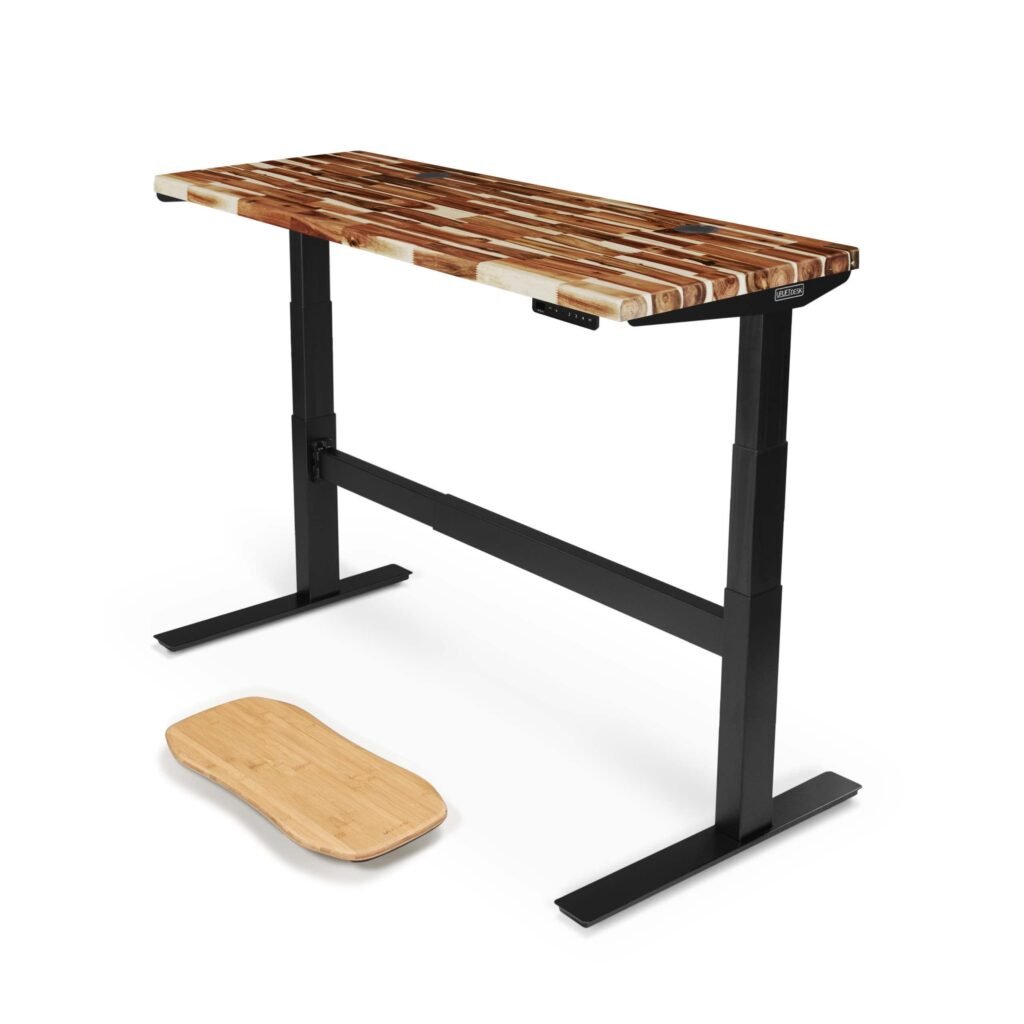
Uplift V2 Standing Desk Review: Complete Analysis of Features, Performance & Value
The Uplift V2 Standing Desk is widely regarded as one of the most well-engineered standing desks on the market. This isn’t just another adjustable desk—it’s a thoughtfully designed workspace solution that delivers on its promise of quality, stability, and smooth operation.
Bottom Line: The Uplift V2 Standing Desk delivers exceptional performance across all key metrics. While it commands a premium price, the exceptional build quality, whisper-quiet motor operation, and extensive customization options make it worthwhile for serious home office setups and professionals who spend significant time at their desk.
Key Specifications & Features
| Specification | Details |
|---|---|
| Height Range | 25.3" – 50.9" |
| Weight Capacity | 355 lbs |
| Desktop Options | 30+ materials and sizes (42" to 80" wide) |
| Motor Type | Dual motor system |
| Noise Level | <50 dB |
| Speed | 1.5" per second |
| Memory Presets | 4 programmable positions |
| Warranty | 15 years (frame), 5 years (electronics) |
| Assembly Time | 45-60 minutes |
| Price Range | Starting around $599 for basic configurations |
Build Quality: Engineering That Inspires Confidence
The moment you unbox the Uplift V2, the attention to manufacturing quality becomes apparent. The steel frame feels substantial without being unnecessarily bulky, and the powder-coated finish is designed to hold up well to daily use without showing scratches or wear marks.
Frame Construction
The dual-motor system represents the desk’s engineering highlight. Unlike single-motor competitors that often struggle with heavier loads or develop wobble over time, the V2’s synchronized motors provide consistent lifting power across the entire desktop. The steel legs telescope smoothly with minimal play, and the crossbar design adds crucial lateral stability.
The desk performs well with substantial monitor setups (dual displays, laptops, printers, and various accessories), with movement remaining smooth and controlled throughout the entire height range.
Desktop Quality Assessment
The V2 is available with Uplift’s bamboo desktop option, which offers quality that exceeds expectations. The bamboo surface features a consistent grain pattern, smooth finish, and integrated wire management grommets that feel purposeful rather than afterthought additions. The desktop is designed to show no sagging or flex even when loaded with equipment.
For those preferring other materials, Uplift offers over 30 desktop combinations including reclaimed wood, laminate, and eco-friendly options. This level of customization sets it apart from competitors offering limited surface choices.
Performance: Smooth Operation Meets Practical Functionality
Motor Performance
The dual-motor system operates at whisper-quiet levels—genuinely under 50 decibels as claimed. During video calls, the motor operation is typically unnoticeable, which speaks volumes about the motor refinement.
Height transitions happen at 1.5 inches per second, striking the right balance between speed and control. It’s fast enough to avoid that "watching paint dry" feeling but controlled enough that items on the desktop remain stable during movement.
Memory Presets & Controls
The four-position memory system is designed to work reliably over extended use. Setting presets is intuitive—hold the desired number button while the desk reaches your preferred height. The LED display clearly shows current height and selected memory position.
Users typically program positions for sitting (28"), standing (42"), presentation mode (45"), and a "focus" height (40") that works well with ergonomic monitor stands. This variety can improve work-from-home productivity by making position changes effortless.
Ease of Use: From Assembly to Daily Operation
Assembly Experience
Assembly typically takes approximately 50 minutes working alone with basic tools. The instructions are clear with helpful illustrations, and all necessary hardware comes properly labeled. The most challenging aspect involves aligning the motors with the legs, but even this step follows logically.
One helpful tip: assemble the desk in your intended location if possible. While not excessively heavy, the completed desk requires two people to move safely.
Daily Usability
The V2 integrates seamlessly into daily workflow. The control panel’s intuitive layout means no learning curve, and the memory presets eliminate guesswork about optimal heights. The desk remembers settings even after being unplugged, which proves convenient during office rearrangements.
Cable Management Excellence
Wire management deserves special mention. The built-in grommets and optional cable management accessories (including an under-desk cable tray) keep the workspace clean and professional-looking. The cable tray mounts securely underneath the desktop and provides excellent organization for power cords, USB cables, and ethernet connections, ensuring they move smoothly with the desk during height adjustments without tangling or creating visual clutter. This thoughtful approach to cable organization eliminates the messy appearance that can plague many standing desk setups.
Value Analysis: Premium Pricing with Justifiable Benefits
Starting around $599 for basic configurations, the V2 sits firmly in premium pricing territory. Prices vary based on desktop size (up to 80″ wide), material choice (laminate vs bamboo vs hardwood), and included accessories like keyboard trays and monitor arms. For current pricing and specific configurations, check the product listings for accurate information.
Long-Term Investment Perspective
The 15-year frame warranty demonstrates Uplift’s confidence in build quality. Considering most office workers spend 8+ hours daily at their desk, the cost-per-use over the warranty period makes financial sense compared to replacing cheaper alternatives every few years.
Health and Productivity Benefits
While difficult to quantify precisely, the ease of transitioning between sitting and standing positions can improve daily comfort and afternoon energy levels. The investment can pay dividends in reduced back discomfort and improved focus during long work sessions.
Comparison with Budget Alternatives
Compared to budget standing desk converters around $300 that can feel flimsy and take up valuable desktop real space, the V2’s integrated design and smooth operation represent a significant quality-of-life improvement that can justify the price premium for serious desk users.
Competition Comparison
FLEXISPOT E7: The Value Alternative
The FLEXISPOT E7 Standing Desk offers similar dual-motor performance at roughly 30% lower cost. While build quality remains solid, the E7 uses a plastic control panel versus the V2’s premium metal unit, and warranty coverage is shorter (7 years versus 15 years). The E7 also has a lower weight capacity (275 lbs vs 355 lbs) and fewer desktop customization options, making it better suited for lighter loads and users prioritizing value over premium features.
Jarvis Desk: The Close Competitor
Fully’s Jarvis Desk matches the V2’s price range and offers comparable features including dual motors and memory presets. The V2 generally offers quieter and smoother motor operation, particularly under heavy loads. The Jarvis wins on frame color options (offering silver and white beyond standard black) but the V2 provides longer warranty duration (15 years vs 7 years).
IKEA Bekant with Olov Legs: Budget Option
For budget-conscious buyers, IKEA’s manual height-adjustable solutions start under $200 but require manual cranking and offer limited height ranges. These work for occasional adjustment but lack the smooth, motorized convenience that makes regular position changes practical.
Pros and Cons
Strengths
- Exceptional build quality with premium materials throughout
- Whisper-quiet operation suitable for open offices or video calls
- Extensive customization with 30+ desktop options and sizes
- Smooth, controlled height adjustment with reliable memory presets
- Outstanding warranty coverage (15 years frame, 5 years electronics)
- Professional appearance that elevates any office aesthetic
- High weight capacity (355 lbs) accommodates heavy equipment loads
- Excellent cable management system keeps workspace organized
Weaknesses
- Premium pricing may exceed budget-conscious buyers’ comfort zone
- Limited frame color options (black or white only)
- Assembly complexity requires time and patience, though manageable
- Desktop pricing for premium materials can add significantly to base cost
- Large footprint may not suit compact office spaces
- Heavy weight makes repositioning difficult without help
- Premium desktop materials may show wear more readily than laminates
Who Should Buy the Uplift V2
Ideal Candidates
Remote professionals and home office workers who spend 6+ hours daily at their desk will appreciate the build quality and smooth operation. The health benefits and productivity improvements can justify the investment for serious desk users.
Tech professionals with heavy equipment loads benefit from the 355-pound weight capacity and stable platform that accommodates multiple monitors, desktop computers, and peripherals without flex or wobble.
Quality-focused buyers seeking a long-term workspace solution will value the exceptional warranty coverage and premium materials that maintain appearance over years of daily use.
Who Should Look Elsewhere
Budget-conscious buyers might find better value in alternatives like the FLEXISPOT E7 Standing Desk, which offers solid performance at lower price points with some feature compromises.
Minimal desk users who primarily use laptops or single-monitor setups might find the V2’s capabilities and price point excessive for their needs.
Renters or frequent movers should consider the assembly complexity and substantial weight when evaluating portability needs.
Final Verdict: A Premium Investment That Delivers
Note: Due to multiple configuration options and regular pricing updates, verify current pricing and specific product configurations before purchasing.
The Uplift V2 Standing Desk earns its premium positioning through exceptional execution across every aspect of design and performance. While the initial investment feels substantial, the combination of build quality, smooth operation, and comprehensive warranty coverage creates compelling long-term value.
Recommendation: Buy if you’re serious about your workspace setup, spend significant daily hours at your desk, and value quality construction that will last years. The V2 transforms the standing desk experience from novelty to genuinely useful productivity tool. It’s particularly worthwhile if you need the high weight capacity, extensive customization options, or plan to use the desk for 5+ years.
Skip if you’re budget-constrained, have minimal desk space requirements, or need maximum portability. Less expensive alternatives like the FLEXISPOT E7 can meet basic standing desk needs without the premium features and price point. Similarly, occasional users might find better value in manual alternatives or desk converters.
For professionals investing in their daily work environment, the Uplift V2 Standing Desk represents one of the market’s best combinations of quality, functionality, and long-term reliability. It’s an investment in both workspace quality and personal health that can pay dividends through years of comfortable, productive use.