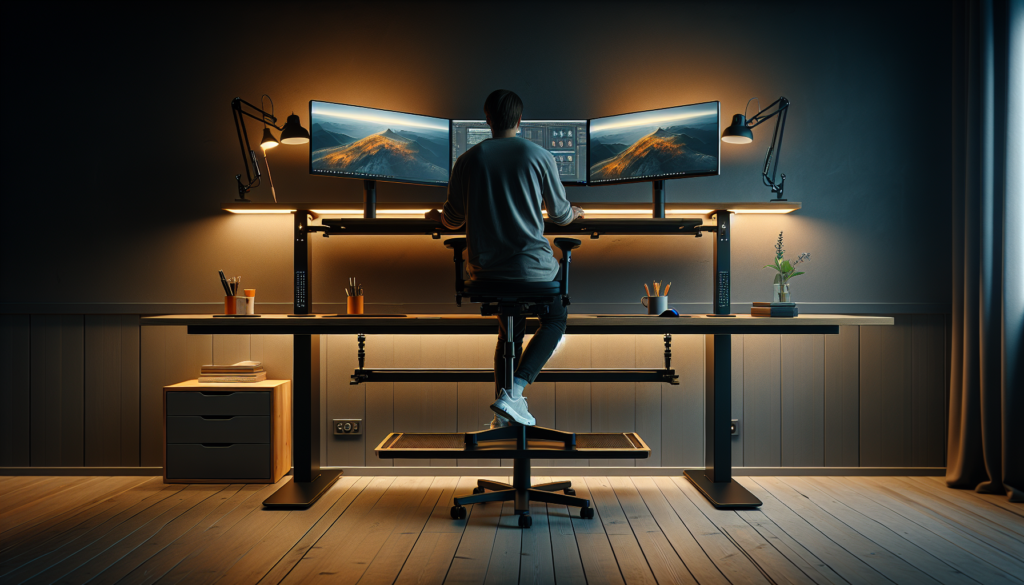
The Complete Guide to Work From Home Desk Setup: 15 Essential Tips for Maximum Productivity
The shift to remote work has fundamentally transformed how we think about our workspace. While some may miss the structured environment of a traditional office, creating an effective work from home desk setup offers unprecedented opportunities to customize your environment for peak productivity, comfort, and well-being. A well-designed work from home desk setup serves as the foundation for professional success, influencing everything from daily output to long-term health outcomes while supporting the millions of professionals who have embraced remote work permanently.
Your home office desk setup serves as the command center for your professional life, influencing everything from your daily output to your long-term health outcomes. Whether you’re working from a dedicated home office, a corner of your living room, or even a kitchen table, the principles of ergonomic design, organizational efficiency, and environmental optimization remain constant.
This comprehensive guide will walk you through every aspect of creating the ideal work from home desk setup, from selecting the perfect desk and chair combination to optimizing lighting, managing cables, and incorporating productivity-boosting accessories. We’ll explore solutions for every space constraint and budget, ensuring you can transform any area into a professional, comfortable workspace that supports your success.
Understanding Your Home Office Needs
Before diving into specific products and setups, it’s crucial to assess your unique work requirements, space constraints, and personal preferences. The best home office desk setup varies dramatically based on your profession, working style, available space, and budget considerations.
Assessing Your Work Style and Requirements
Consider how you spend your typical workday. Are you primarily focused on computer-based tasks, or do you need space for physical documents, creative materials, or multiple monitors? Customer service representatives might prioritize acoustic considerations and headset comfort, while graphic designers need color-accurate displays and drawing tablet space.
Your meeting frequency also impacts desk setup decisions. If you’re on video calls throughout the day, camera positioning, backdrop aesthetics, and lighting become critical factors. Alternatively, if you work primarily in focused, independent sessions, you might prioritize comfort features and distraction-minimizing elements.
Space Analysis and Layout Planning
Evaluate your available space realistically. Measure not just floor space but also consider ceiling height, window placement, electrical outlet locations, and traffic patterns. A cramped setup that blocks natural pathways or forces you into uncomfortable positions will ultimately harm productivity regardless of how premium your equipment might be.
Small spaces require creative solutions but shouldn’t compromise on ergonomic principles. Wall-mounted desks, corner configurations, and multi-functional furniture can maximize limited square footage while maintaining professional functionality. Small home office organization becomes crucial in these situations, requiring strategic thinking about vertical storage and multi-purpose furniture solutions.
Essential Desk Selection: Finding Your Foundation
Your desk serves as the foundation for everything else in your setup. The right desk balances size, functionality, adjustability, and aesthetic appeal while fitting within your space and budget constraints. When searching for the best home office desk 2025, consider both current needs and future growth potential.
Standing Desk vs. Traditional Desk Comparison
| Feature | Standing Desk | Traditional Desk |
|---|---|---|
| Health Benefits | Reduces sitting time, may improve posture | Stable, familiar working position |
| Adjustability | Height adjustable for sitting/standing | Fixed height, requires proper chair selection |
| Energy Levels | May boost alertness and energy | Comfortable for extended focused work |
| Cost | Generally $300-$1500+ | Wide range $100-$1000+ |
| Space Requirements | Similar footprint, considers standing clearance | Standard clearance needs |
| Learning Curve | Requires adjustment period and anti-fatigue mat | Immediate familiarity |
The UPLIFT V2 Standing Desk represents the gold standard in adjustable height desks, offering smooth electric adjustment, excellent stability, and a wide range of size options. For budget-conscious buyers, the FlexiSpot E7 Standing Desk provides similar functionality at a more accessible price point.
Size and Configuration Options
Desk size should accommodate your equipment with room for comfortable arm movement and document placement. A 48-inch wide desk works well for most single-monitor setups, while dual-monitor configurations typically require 60 inches or more for optimal spacing.
L-shaped desks maximize surface area in corners and provide natural separation between different work activities. The Bush Furniture Salinas L-Shaped Desk offers excellent value in this category, combining ample workspace with built-in storage solutions.
For small spaces, wall-mounted desks or compact writing desks can provide functional workspace without overwhelming the room. The Prepac Wall Mounted Floating Desk exemplifies space-efficient design while maintaining professional appearance.
Ergonomic Chair Selection: Your Health Investment
An ergonomic office chair represents one of the most important investments in your home office setup. Poor seating leads to back pain, reduced productivity, and long-term health issues that far exceed the cost of quality furniture. When you buy ergonomic office chair options, focus on adjustability, support, and long-term durability rather than initial comfort alone.
Key Ergonomic Features to Prioritize
Lumbar support ranks as the most critical feature, maintaining the natural curve of your spine during extended sitting periods. Adjustable seat height ensures your feet rest flat on the floor with thighs parallel to the ground. Armrests should support your arms at a 90-degree angle, reducing shoulder and neck tension.
Seat depth and width accommodate different body types, while breathable materials prevent heat buildup during long work sessions. Quality casters and swivel mechanisms facilitate easy movement without straining to reach different areas of your workspace.
Top Chair Recommendations by Budget
| Budget Range | Chair Recommendation | Key Features |
|---|---|---|
| Premium ($600+) | Herman Miller Aeron | Mesh design, full adjustability, 12-year warranty |
| Mid-Range ($300-600) | Steelcase Series 1 | Excellent lumbar support, modern design, durable |
| Budget ($150-300) | IKEA Markus | Mesh back, adjustable height, solid value |
| Entry-Level ($75-150) | Amazon Basics Ergonomic Chair | Basic adjustability, decent comfort for price |
The Herman Miller Aeron Chair remains the benchmark for premium ergonomic seating, though its significant investment makes it suitable primarily for users spending 6+ hours daily at their desk. For most remote workers, the Steelcase Series 1 provides exceptional comfort and durability at a more reasonable price point.
Budget-conscious buyers shouldn’t overlook the IKEA Markus Chair, which delivers impressive ergonomic features and build quality that rivals chairs costing twice as much.
Monitor Setup and Display Optimization
Your monitor configuration significantly impacts both productivity and eye health. Proper positioning, size selection, and display quality create a comfortable viewing experience that reduces strain during extended work sessions.
Single vs. Dual Monitor Configurations
Single monitor setups work well for focused tasks and smaller spaces but may require frequent window switching that interrupts workflow. A single 27-32 inch monitor can provide ample screen real estate for most tasks while maintaining a clean, minimal aesthetic.
Dual monitor configurations boost productivity for multitasking-heavy roles, allowing simultaneous document viewing, research, and communication. The key lies in proper positioning—monitors should be at arm’s length, with tops at or slightly below eye level.
Monitor Positioning and Eye Health
Position your primary monitor directly in front of you, with the top of the screen at or slightly below eye level. This reduces neck strain and maintains a neutral head position. Secondary monitors should be angled slightly inward and positioned at the same height as your primary display.
The VIVO Dual Monitor Desk Mount provides excellent adjustability for dual monitor setups, while the AmazonBasics Single Monitor Stand offers clean cable management and height adjustment for single displays.
Consider blue light filtering for extended computer use. Many modern monitors include built-in blue light reduction features, or you can add software solutions like f.lux for older displays.
Home Office Lighting Ideas: Creating the Perfect Environment
Proper lighting reduces eye strain, improves mood, and enhances video call appearance. The ideal home office combines natural light, ambient lighting, and task-specific illumination to create a comfortable, productive environment. Implementing effective home office lighting ideas can transform your workspace from adequate to exceptional.
Natural Light Optimization
Position your desk perpendicular to windows when possible, avoiding both direct screen glare and backlighting that creates harsh shadows during video calls. Window blinds or curtains provide control over natural light intensity throughout the day.
If facing a window is unavoidable, consider an anti-glare screen protector or monitor hood to reduce reflections and improve screen visibility.
Artificial Lighting Solutions
| Lighting Type | Purpose | Recommended Products |
|---|---|---|
| Task Lighting | Document reading, detailed work | LED desk lamps with adjustable arms |
| Ambient Lighting | Overall room illumination | Ceiling fixtures, floor lamps |
| Bias Lighting | Reduce monitor eye strain | LED strip behind monitor |
| Video Call Lighting | Professional appearance on camera | Ring lights, softbox lights |
The BenQ ScreenBar Plus LED Desk Lamp mounts directly to your monitor, providing excellent task lighting without screen glare. For video calls, the Logitech Litra Glow Streaming Light offers professional-quality illumination that dramatically improves your on-camera appearance.
Bias lighting, achieved with LED strips placed behind your monitor, reduces eye strain by providing ambient light that matches your screen’s brightness level.
Cable Management and Organization
Clean cable management improves both aesthetics and functionality while making cleaning and equipment adjustments much easier. Proper organization also prevents cable damage and reduces fire hazards from tangled power cords.
Essential Cable Management Tools
Under-desk cable trays keep power strips and excess cable length hidden while maintaining easy access for adjustments. Cable clips guide individual cables along desk edges, while spiral cable wrap bundles multiple cables into clean runs.
The JOTO Cable Management Tray mounts easily under most desks and accommodates power strips along with cable storage. For desktop cable control, the Syncwire Cable Clips provide simple, effective guidance for individual cables.
Power Management Solutions
Surge protectors with USB charging ports reduce outlet requirements while protecting valuable equipment. Wall-mounted power strips can eliminate desktop clutter while providing convenient access to frequently used ports.
Consider smart power strips that automatically cut power to peripherals when your computer shuts down, reducing energy waste and eliminating standby power draw from multiple devices.
Storage and Organization Systems
Effective organization systems maintain a clean, professional appearance while ensuring easy access to frequently used items. The key lies in balancing visible storage for active projects with concealed storage for reference materials and supplies. Small home office organization strategies become essential when space is limited.
Desktop Organization Solutions
Desktop organizers should match your work style and aesthetic preferences. Vertical file holders work well for active projects, while drawer organizers keep small items sorted and accessible.
The Bamboo Desktop Organizer with Drawers provides attractive, natural material storage that complements most desk styles while offering multiple compartments for different item types.
Filing and Document Management
Digital document management reduces physical storage requirements, but most home offices still require some paper filing capability. Rolling file cabinets fit under most desks while providing mobile storage that can move with your work.
For minimal paper handling, desktop file sorters or wall-mounted filing systems can handle active documents without requiring dedicated floor space.
Technology Integration and Accessories
The right accessories enhance productivity, comfort, and professional presentation. Focus on items that solve specific problems or streamline frequent tasks rather than accumulating gadgets for their own sake.
Essential Productivity Accessories
| Accessory Category | Purpose | Top Recommendations |
|---|---|---|
| Keyboard/Mouse | Input comfort and efficiency | Wireless, ergonomic designs |
| Webcam | Video call quality | 1080p minimum, good low-light performance |
| Headset | Audio clarity, noise cancellation | Wireless preferred for mobility |
| Document Camera | Physical document sharing | USB connection, adjustable positioning |
| Wireless Charging | Reduce cable clutter | Qi-compatible pad or stand |
The Logitech MX Master 3 Wireless Mouse provides exceptional comfort and productivity features, while the Keychron K8 Wireless Mechanical Keyboard offers satisfying typing experience with wireless flexibility.
For video calls, the Logitech C920x HD Pro Webcam remains the standard for reliable, high-quality video, while the Jabra Evolve2 65 Wireless Headset provides professional audio quality with active noise cancellation.
Comfort and Health Accessories
Extended computer use benefits from ergonomic accessories that reduce strain and promote healthy posture. Footrests, wrist supports, and monitor risers address common comfort issues.
The 3M Adjustable Footrest promotes proper leg positioning and circulation, while the Gimars Keyboard Wrist Rest provides cushioned support for extended typing sessions.
Anti-fatigue mats become essential for standing desk users, providing cushioned support that reduces leg and back fatigue during standing work sessions.
Small Space Solutions and Optimization
Limited space requires creative solutions that maximize functionality without compromising comfort or professionalism. The key lies in vertical utilization, multi-functional furniture, and careful equipment selection. Small home office organization becomes critical in maximizing every square foot.
Compact Desk Solutions
Wall-mounted desks free up floor space while providing adequate work surface for laptop-based work. Murphy desk designs fold away when not in use, completely concealing the office in multi-purpose rooms.
The Prepac Wall Mounted Floating Desk with Storage combines workspace with concealed storage, ideal for small apartments or shared spaces.
Vertical Storage Strategies
Wall-mounted shelving, over-door organizers, and tall, narrow storage units utilize vertical space efficiently. Focus on storing less frequently used items higher up while keeping daily essentials within easy reach.
Pegboard systems offer flexible, customizable storage that adapts to changing needs while maintaining an organized, professional appearance.
Home Office Productivity Tips: Maximizing Your Work From Home Desk Setup
Beyond physical setup, your work from home desk setup success depends on establishing routines, boundaries, and habits that support sustained productivity. These home office productivity tips help transform your physical space into a high-performance work environment.
Creating Boundaries and Routines
Establish clear start and end times for your workday, even when working from home. Physical cues like adjusting your desk height, turning on task lighting, or organizing your desktop signal the transition into work mode.
Create rituals that separate work time from personal time. This might involve closing laptop screens, covering equipment, or physically stepping away from your work from home desk setup at day’s end.
Minimizing Distractions
Position your desk to minimize visual distractions while maintaining some connection to your living space. Noise-canceling headphones, white noise machines, or background music can help maintain focus in shared spaces.
Establish household rules about interruptions during work hours, especially important when family members are present during your workday.
Budget Planning and Investment Priorities
Creating an effective work from home desk setup doesn’t require unlimited spending, but strategic investment in key areas provides the best return on comfort, productivity, and long-term satisfaction. When planning to buy ergonomic office chair options and other essentials, prioritize items that affect daily comfort and health.
Essential vs. Nice-to-Have Purchases
| Priority Level | Items | Budget Allocation |
|---|---|---|
| Essential | Desk, chair, monitor, lighting | 60-70% of budget |
| Important | Cable management, storage, ergonomic accessories | 20-25% of budget |
| Nice-to-Have | Aesthetic upgrades, advanced accessories | 10-15% of budget |
Start with the essentials—a properly sized desk, ergonomic chair, and adequate lighting—before adding convenience features or aesthetic improvements. Quality basics provide more benefit than numerous mediocre accessories.
Cost-Effective Upgrade Strategies
Consider used office furniture from business closures or corporate upgrades. High-quality commercial furniture often costs less on the secondary market while providing better durability than new consumer-grade alternatives.
Phased purchasing allows you to spread costs over time while learning what features matter most in your specific work environment. Start with basics and add improvements based on actual experience rather than anticipated needs.
Maintenance and Long-term Optimization
Regular maintenance preserves your investment while ensuring continued comfort and functionality. Establish cleaning routines, equipment care practices, and periodic reassessment of your setup’s effectiveness.
Cleaning and Care Routines
Weekly cleaning prevents dust buildup that can affect equipment performance and air quality. Use appropriate cleaners for different materials—gentle solutions for monitors, leather conditioner for chair maintenance, and compressed air for keyboard cleaning.
Cable management benefits from periodic reorganization as equipment changes or additions modify your setup requirements.
Ergonomic Reassessment
Body changes, new equipment, or evolving work requirements may necessitate setup adjustments. Quarterly reassessment ensures your workspace continues supporting your health and productivity effectively.
Monitor wear patterns in chair cushions, desk surfaces, and frequently used accessories. Proactive replacement prevents discomfort and maintains professional appearance.
Conclusion: Perfecting Your Work From Home Desk Setup
Creating the ideal work from home desk setup requires balancing ergonomic principles, productivity needs, space constraints, and budget considerations. The most effective approach starts with understanding your specific work requirements and available space, then strategically investing in quality basics—finding the best home office desk 2025 options, selecting an ergonomic chair, implementing effective home office lighting ideas, and developing small home office organization systems that support your workflow.
The investment in a well-designed home workspace pays dividends in improved health, enhanced productivity, and greater job satisfaction. Whether you’re working from a dedicated office or optimizing a corner of your living space, applying these home office productivity tips will create a professional, comfortable environment that supports your success while maintaining the work-life balance that makes remote work attractive.
Remember that your work from home desk setup will evolve with your needs, work requirements, and available budget. Start with essential elements that provide the greatest impact on comfort and productivity, then gradually add accessories and upgrades based on actual experience rather than anticipated needs. Take time to implement changes gradually, allowing yourself to adjust to new equipment and arrangements before making additional modifications.
Your perfect home office setup is ultimately the one that best serves your unique combination of work requirements, space constraints, and personal preferences while promoting long-term health and productivity. By following these guidelines and remaining flexible in your approach, you’ll create a workspace that not only supports your current needs but adapts to your future professional growth.